商品信息
基本参数
- 产地广东
- 品牌
- 产品型号
- 产品操作
- 产品应用范围
- 产品材料等级
- 产品表面处理
- 体积(m²)
- 产品重量(kg)
- 型号bdy-604
- 品牌邦徳裕BANDEYOO
- 加工定制是
产品简介:
产品详情:注意:
该产品的报价是参考价,仅用于支持在线交易。
详细的产品基准和价格!直接拍下不联系不支持发货
我厂专业生产指纹密码锁,豪华门锁,室内门锁,欧式门锁,门锁,锌合金门锁,太空铝门锁,201.304不锈钢门锁,质量保证,价格优惠有需要的人可以联系微信:
公司成立9年,5年电子商务经验!
15天包换,3年保修,终身维护质量有保证!
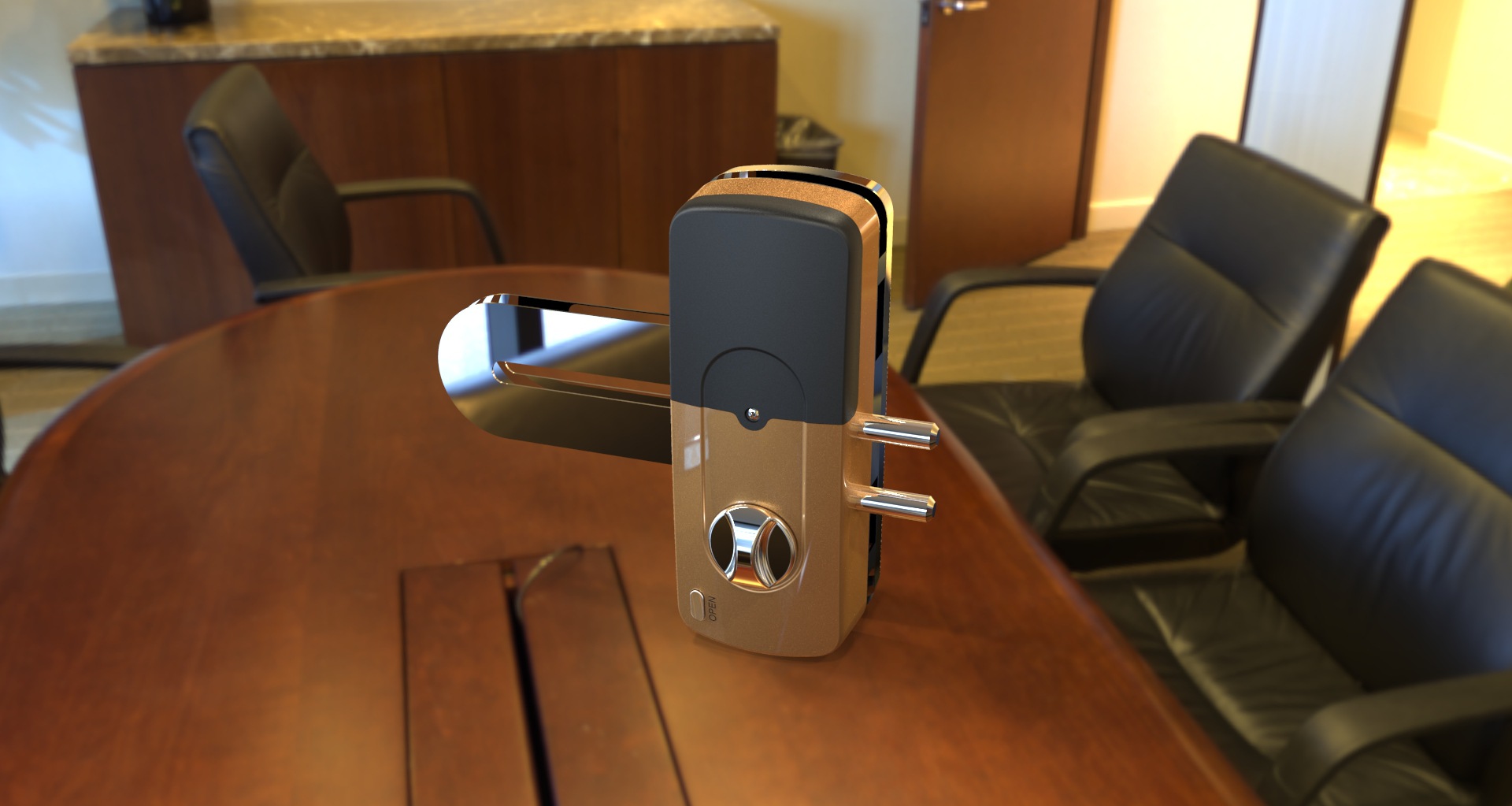
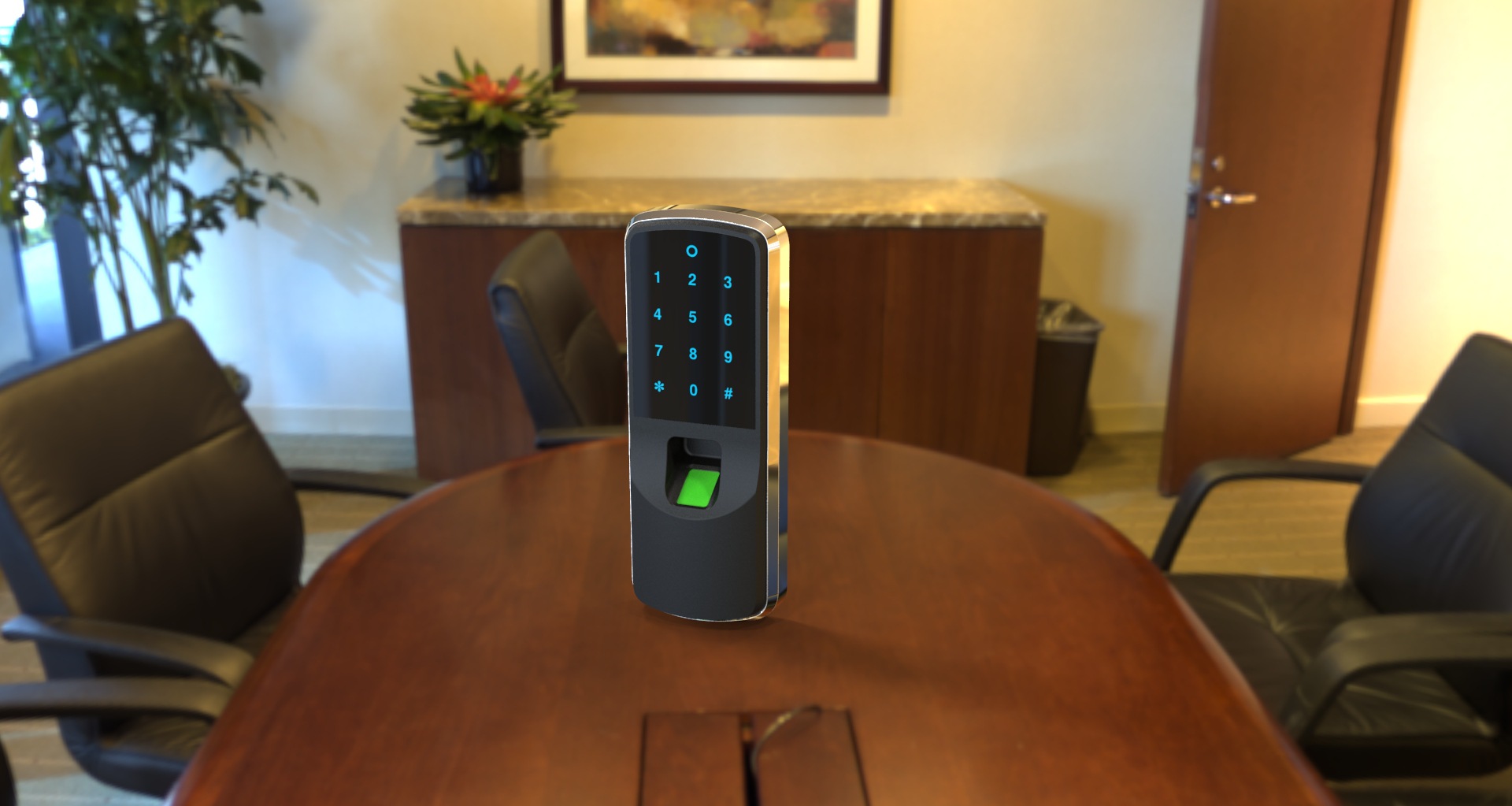
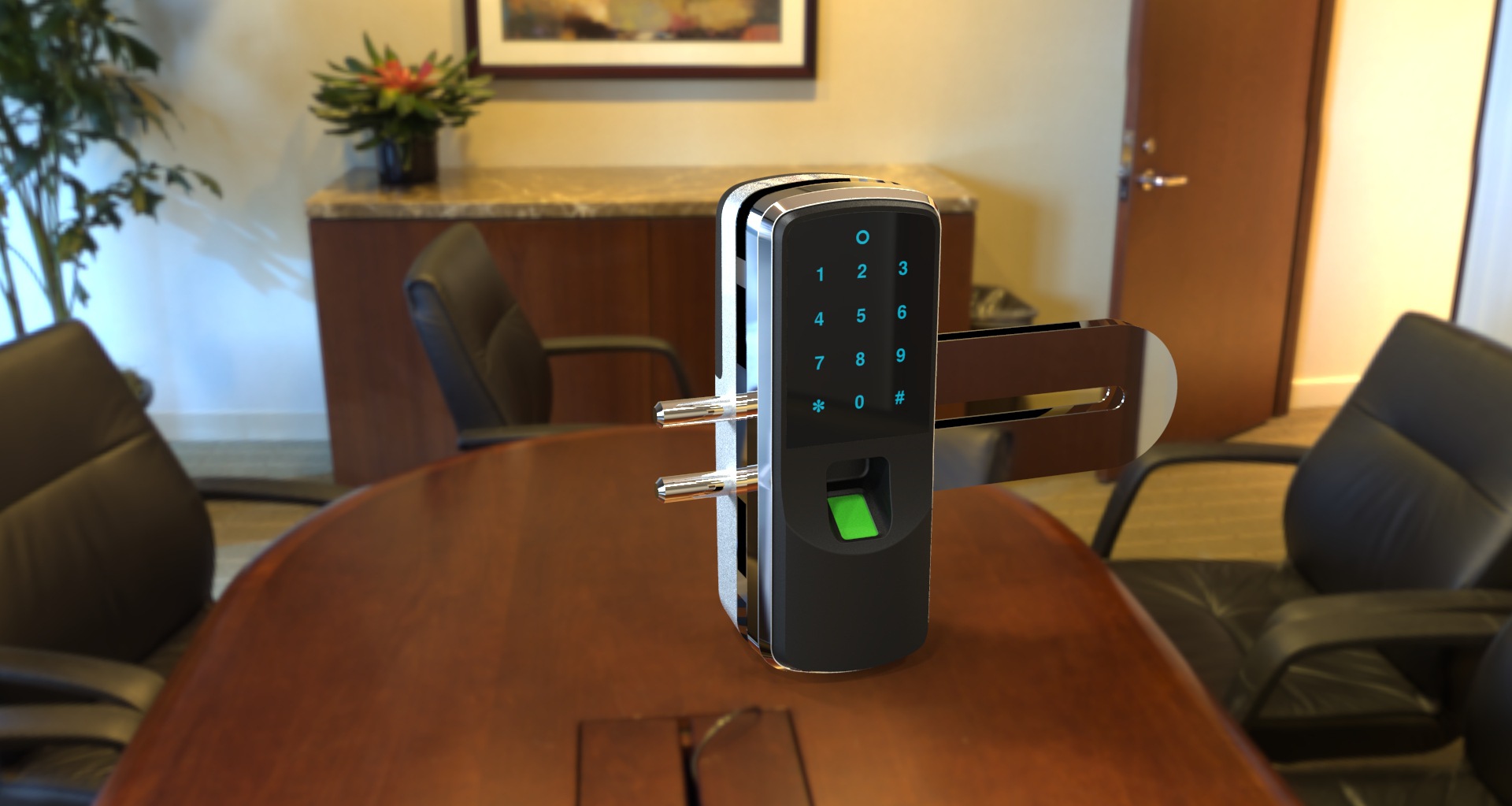
深圳市跃明达五金模具公司是目前智能门锁系列制造商,拥有最齐全的电子门锁品种和最完善的功能。根据不同的原料和不同的形状,可以制造出不同样式的智能门锁。不锈钢,全铜,锌合金铝合金,高档门锁,质量稳定,经济,实用的指纹密码锁卡式门锁稳固结实,抗破坏性强,于2016年新推出,是该国首款性价比最高的家用电子产品。门锁,适用于所有家庭房间的通用门锁,公寓,办公室门锁,工厂校园宿舍门锁。价格为低,质量稳定。它可以直接替代所有的家居装饰机器锁,球形锁等,充分享受智能家居的乐趣,为用户带来更多的便利和安全。
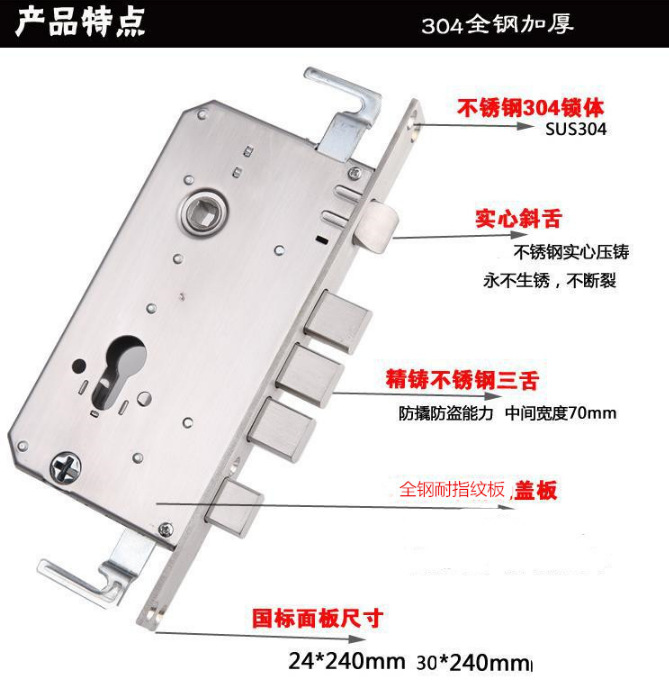
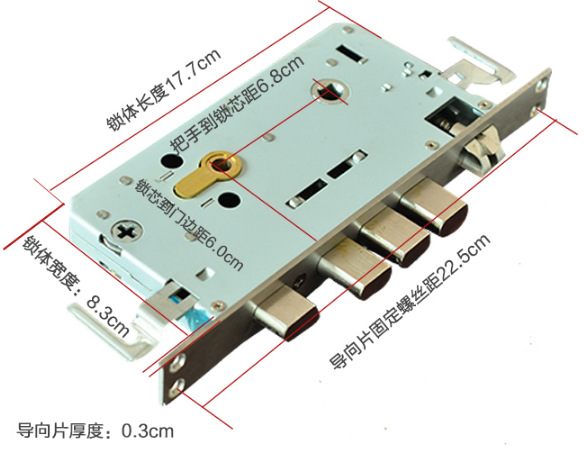
拍摄前注意:如果您的锁体侧面为a。宽24mm*长240mmb.宽30mm*长240mmc.宽40mm*长388mm(大霸王锁体加80元)这3种尺寸大致可分为备注。直接付款,我们将在24小时内将其寄给您
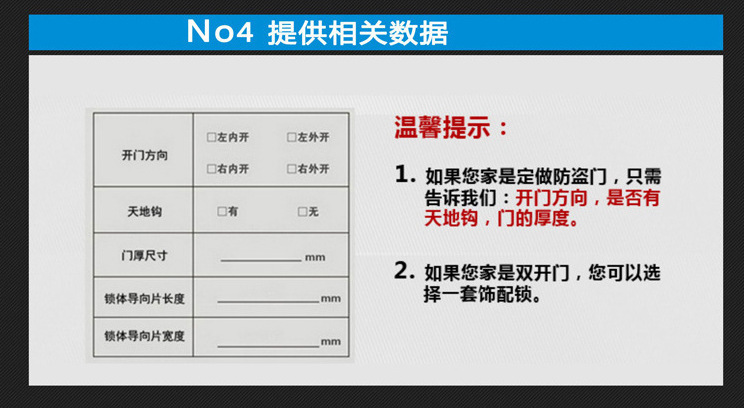
如果您的身高不超过上述尺寸,请不要在拍照前直接付款。给我以下参数,以便为您配备相应的锁体。
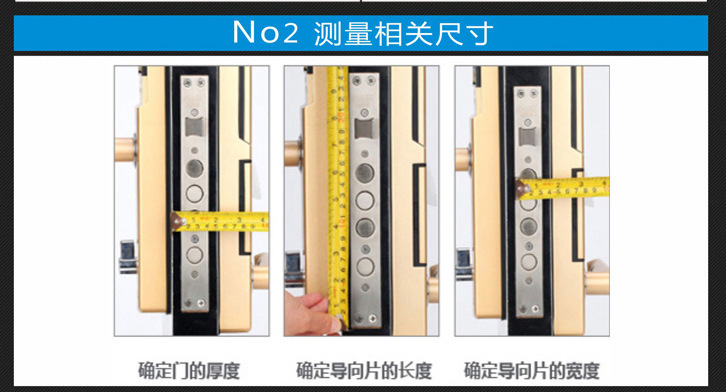
1.门的厚度:
2.导向片的长度和宽度
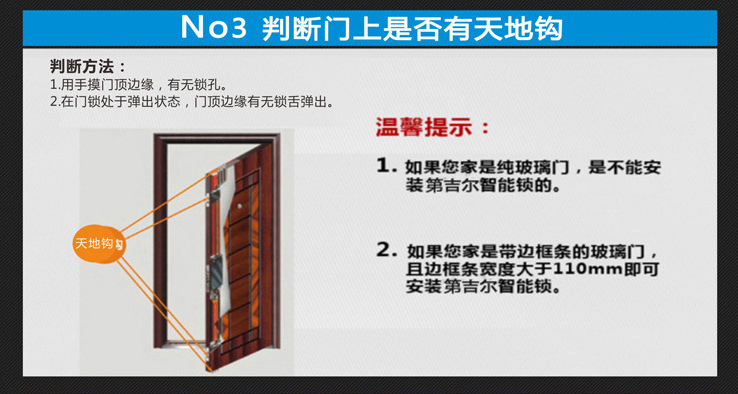
3.是否有天地钩,
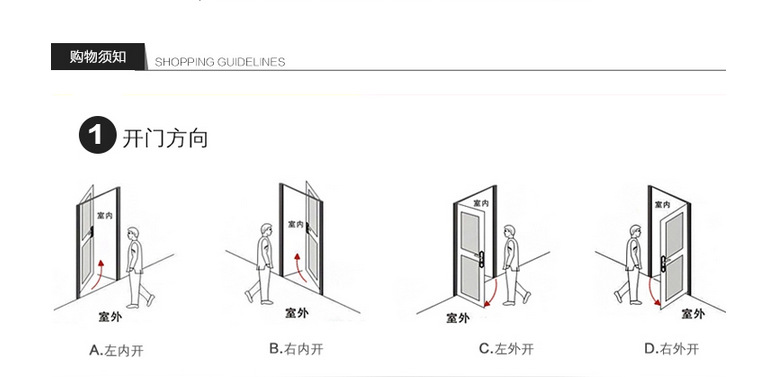
4.开门方向。
如果您不理解,则可以阅读具体说明并教您如何进行测量。标准安全门可以在24小时内发货,发送顺丰陆运快递,您也可以为一些紧急的门加钱,发送顺丰空运。
单个锁体是特殊的。需要定制的锁体。定制的锁体交付速度会很慢。通常,三天到一周的交货时间,请与我们联系。配备:防盗锁芯+天地杆
该产品广泛用于现代办公室,办公大楼,高档住宅公寓,别墅等。用户可以自由选取开门方式:
13.绩效指标:
额定工作电压:6v(四节5#碱性干电池)
额定工作电流:动态300ma,静态<50ua
低压提示电压:4.8v
工作温度:-10〜50℃
工作湿度:<95%rh
手册英文版:
M1Card+Password+Fingerprint LockInstructions
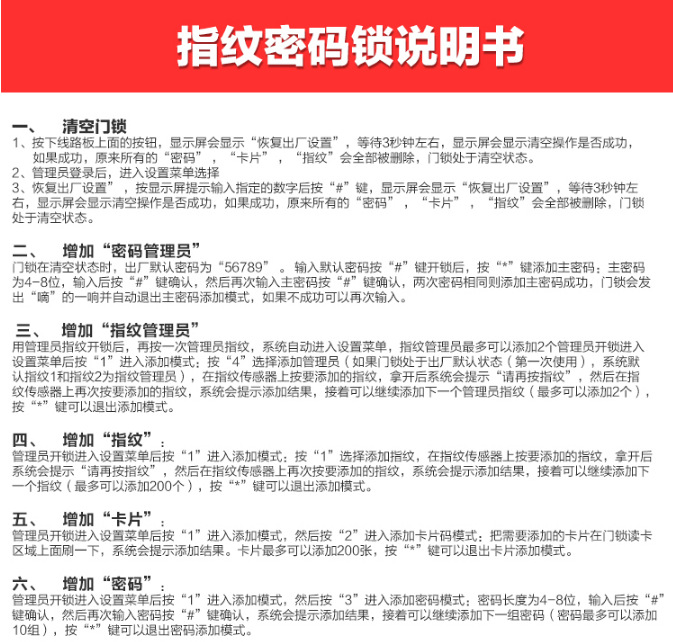
1.Reset the lock
1.Press the button on the circuitboard, the display will show "restore factory settings“,wait for 3 seconds, the display will show whether the flush operation is successful or not. If successful,all existing”password“,”card“,”fingerprint“will be deleted, the lock is in a clear state, and will automatically switch to the "standard mode”。
2.After an administrator unlock the lock and enter the setup menu,use“上/下” keys to select "System Settings”,press“right” key to enter the “System Setup” menu,and then through the "up/down” keys to select "Restore factory settings”:Press the "right” key to select, enter the specified numbers following the screenprompts,press“#”keyto confirm, the display will show "Restore factory settings“,wait for 3 seconds, the display will show whether the flush operation is successful or not. If successful,all existing”password“,”card“,”fingerprint“will be deleted, the lock is in a clear state, and will automatically switch to the "standard mode”。
2.Add user(Standardmode)
1.Add administrator
(1)Add“Password Administrator”
Wheninclearstate, the factory default passwordis“56789”。Enter the default password and press“#”keyto unlock, the system prompts the "unlocked by default password,please add administrator". Enter an administrator password (administrator passwordis 4-8digitlong),thenpress“#”keyto confirm,re-enter the administrator password again and press“#” key to confirm. If they match, then the master password is added successfully, the system will prompt "operation success”。Ifunsuccessful,you can try again. Only on password for the password administrator can be added。
(2)Add“fingerprint administrator”(after fingerprint administrator unlock the lock using fingerprint, enter the fingerprint again, the system automatically entering the setup menu,up to two fingerprint administrators can beadded)
After an administrator unlock the lock and enter the setup menu,use“上下” keys to select“Add User”,press“right" key to enter Add menu,and then use "up/down” keys to select“Add administrator”,press“right" key to enter “add fingerprint administrator” mode (if the lock is in factory-default state (first time use),the system will take the first and second fingerprints as fingerprintadministrators),use the fingerprint sensor to add fingerprint, the system will prompt "press fingerprint again" and then use the fingerprint sensor to add fingerprint again, the system will show the result. Repeat to add the next administrator fingerprint (can add up to 2)。Press“*” key to exit the Add mode。
2.Addfingerprint
After an administrator unlock the lock and enter the setup menu,use“上/下” keys to select“Add User”,press“right" key to enter Add menu,and then use "up/down” keys to select”Addfingerprint“,press”right" key to enter“addfingerprint”mode,use the fingerprint sensor to add fingerprint, the system will prompt "press fingerprint again" and then use the fingerprint sensor to add fingerprint again, the system will show the result. Repeat to add the next fingerprint (up to 200)。Press“*” key to exit the Add mode。
3.Addcard
After an administrator unlock the lock and enter the setup menu,use“上/下” keys to select“Add User”,press“right" key to enter Add menu,and then use "up/down” keys to select”Addcard“,press”right" key to enter“addcard”mode,use the card reader to add card, the system will show the result. Up to 200 cards can be added. Press "*" key to exit the Add mode。
4.Addpassword
After an administrator unlock the lock and enter the setup menu,use“向上/向下” keys to select“Add User”,press“right" key to enter Add menu,and then use "up/down” keys to select“Addpassword”,press“right" key to enter”addpassword”mode,passwordis 4-8digitlong. Enter password and press“#”keyto confirm, then enter password again and press“#”keyto confirm, the system will show the result. Repeat to add next password (up to10)。Press“*” key to exit the Add mode。
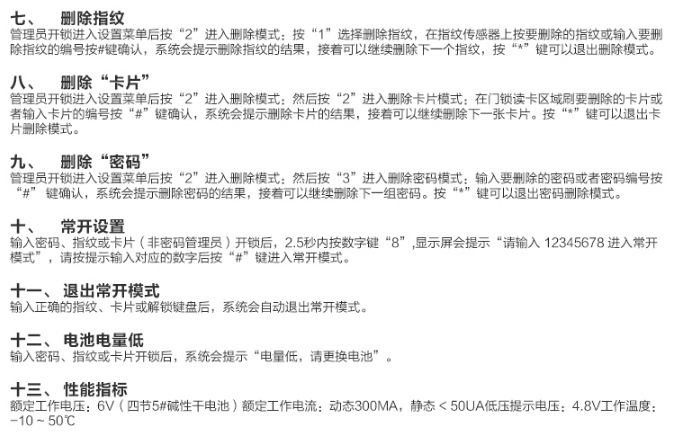
3.Deleteuser(standardmode)
1.Deletefingerprint
After an administrator unlock the lock and enter the setup menu,use“上/下” keys to select "Delete user”,press“right" key to enter delete menu,and then use "up/down” keys to select "Delete fingerprint”,press“right" key to enter “Delete fingerprint” mode,use fingerprint sensor or fingerprint number to enter the fingerprint to be deleted,press the“#”keyto confirm, the system will show the result. Repeat to delete next fingerprint. Press "*" key to exit delete mode。
2.Deletecard
After an administrator unlock the lock and enter the setup menu,use“上/下” keys to select "Delete user“,press”right" key to enter delete menu,and then use "up/down” keys to select "Delete card“,press”right" key to enter“Deletecard”mode,use swipe the card on card reader or enter card number to delete the card,press the“#”keyto confirm, the system will show the result. Repeat to delete next card. Press "*" key to exit delete mode。
3.Deletepassword
After an administrator unlock the lock and enter the setup menu,use“上/下” keys to select "Delete user“,press”right" key to enter delete menu,and then use "up/down” keys to select“Deletepassword”,press“right" key to enter “Delete password”mode,enter password to be deleted or enter password number,press the“#”keyto confirm, the system will show the result. Repeat to delete next password. Press "*" key to exit delete mode。
4.Time setting
After an administrator unlock the lock and enter the setup menu,use“上/下” keys to select "Time Settings”,press“right" key to enter time setting mode, enter the date and time then press“#”keyto confirm,press“*” key to exit time setting mode。
5.Turn开/关Voice
Afterunlock,enter the setup menu,use“上/下” keys to select "System Settings“,press”right" key to enter system setting menu,use“上/下” keys to select “On/Off Voice“,press”#“ key to confirm。
6.Displaycolorselection
Afterunlock,enter the setup menu,use“上/下” keys to select "System Settings”,press“right" to enter the System Setup menu,and then use "up/down” keys to select "Display color selection”,press“right" key to enter color selection menu. There are two display color settings:yellow letters in blue background and white letters in red background and。
7.Edit User
1.After an administrator unlock the lock and enter the setup menu,use“上/下” keys to select“Edit User”,press“right" key to enter”Modify administrator” interface, then use "up/down” keys to select“Modify administrator password”,press“right" key,enter administrator password(4-8digits),press“#”keyto confirm, then enter the password again,press“#” key to confirm. If the two passwords match, the system will show“operation success”。Ifnot successful, try again。
2.After an administrator unlock the lock and enter the setup menu,use“上/下” keys to select“Edit User”,press“right" key to enter”Modify administrator” interface, then use "up/down” keys to select“Modify administratorfingerprint”,press“right" key,use fingerprint sensor to enter fingerprint, the system will prompt “enter fingerprintagain”,enter fingerprintagain,the system will show the result. If not successful, try again。
8.Recordschecking
After an administrator unlock the lock and enter the setup menu,use“上/下” keys to select“Recordcheck”,press“Right" key,you can check up to 200 unlocking records。
9.Restore factory settings
After an administrator unlock the lock and enter the setup menu,use“上/下” keys to select“Recordcheck”,press“Right" key to enter the System Setup menu, then use "up/arrow” keys to select "Restore factory settings”,press“Right" key, the system will prompt "Please enter 55667788 ”,enter the number and press" # "key to confirm. Press" * "key to exit the “Restore factory settings”。
10.Modeswitch
1.Press the button on the circuitboard, the display will show "restore factory settings“,wait for 3 seconds,all existing”password“,”card“,”fingerprint“will be deleted, the lock will automatically switch to the "standard mode”。
2.After an administrator unlock the lock and enter the setup menu,use“上/下” keys to select "System Settings”,press“right” key to enter the system setup menu,and then through the "up/down” keys to select "Restore factory settings”:Press the "right” key to select, enter the specified numbers following the screenprompts,press“#”keyto confirm, the display will show "Restore factory settings“,wait for 3 seconds,all existing”password“,”card“,and”fingerprint“will be deleted, the lock will automatically switch to the "standard mode”。
3.In the“combinationmode”,unlock the lock and enter the setup menu,use“上/下” keys to select "System Settings“,press”right” key to enter the system setup menu,and then through the "up/down” keys to select“Mode Settings”:press“right" key to enter mode selection menu,press”right” key to select "Standard mode“,follow the display prompt to enter the specified numbers and press" # "key to confirm, the display will show" restore factory settings”,wait for 3 seconds,all existing“password”,“card”,and“fingerprint" will be deleted, the lock automatically switch to the "standard mode。”
4.In the "standard mode“,unlock the lock and enter the setup menu,use”上/下“ keys to select "System Settings”,press“right” key to enter the system setup menu,and then use the "up/down” keys to select”Mode Settings“:press”right" key to enter mode selection menu,press“right” key to select“Combinationmode”,follow the display prompt to enter the specified numbers and press" # "key to confirm, the display will show "restore factory settings“,wait for 3 seconds,all existing”password“,”card“,and”fingerprint" will be deleted, the lock automatically switch to the "combination mode". If the operation is successful, the main interface will show a “+”sign between the date and battery capacity to distinguish it from the standard mode。
11.Add user(combinedmode)
1.Add administrator
(1)Add“Password Administrator”
Wheninclearstate, the factory default passwordis“56789”。Enter the default password and press“#”keyto unlock, the system will prompt "unlocked by default password,please add administrator". Enter an administrator password (administrator passwordis 4-8digitlong),thenpress“#”keyto confirm,re-enter the administrator password and press“#” key again to confirm. If they match, then the master password is added successfully, the system will prompt "operation success”。Ifunsuccessful, try again. Only one password for the password administrator can be added。
(2)Add“fingerprint administrator”
After fingerprint administrator unlock the lock using fingerprint, enter the fingerprint again, the system automatically entering the setup menu,up to two fingerprint administrators can be added。
After addingpassword administrator, the system automatically enters add fingerprint administrator mode,you must complete adding 2 fingerprint administrators before you can perform any other operations。
2.Add“fingerprint +password”combination
After an administrator unlock the lock and enter the setup menu,use“上下” keys to select“Add user”,press“right” key to enter add user menu,and then through the "up/down” keys to select“fingerprint + password”,thenpress the "right" key to enter fingerprint + password add mode,presson the fingerprint sensor to add fingerprint, the system will prompt“pressfingerprintagain”,presson the fingerprint sensor again to add fingerprint,ifsuccessful, the system will automatically enters“addpassword”mode,passwordis 4-8digitlong,enter password and press“#”keyto confirm,and then re-enter the password and press“#”keyagainto confirm, display will show the result. Continue to add the next combination (up to 80 combinations)。Press“*” key to exit the Add mode。
3.Add“fingerprint +card”combination
After an administrator unlock the lock and enter the setup menu,use“上/下” keys to select“Add user”,press“right” key to enter add user menu,and then through the "up/down” keys to select "fingerprint + card”,thenpress the "right" key to enter “fingerprint + card” add mode,presson the fingerprint sensor to add fingerprint, the system will prompt“pressfingerprintagain”,presson the fingerprint sensor again to add fingerprint,ifsuccessful, the system will automatically switch to “addcard”mode, put the card on card reader, the system will display the result. Repeat to add the next combination (up to 80 combinations)。Press“*” key to exit the Add mode。
4.Add“password+ card”combination
After an administrator unlock the lock and enter the setup menu,use“上/下” keys to select“Add user”,press“right” key to enter add user menu,use the "up/down” keys to select”password + card“,thenpress the "right" key to enter “password + card” add mode,passwordis 4-8digitlong,after entering password,press“#”keyto confirm, then enter the password again and press the“#”keyto confirm,ifsuccessful, the system will automatically switch to card add mode, put the card on card reader, the system will display the result. Repeat to add the next combination (you can add up to 80 combinations)。Press“*” key to exit the Add mode。
12.Deleteuser(combinationmode)
After an administrator unlock the lock and enter the setup menu,use“上/下” keys to select "Delete user”,press“right" key to enter delete mode, enter the number of the combination to be deleted,press the“#”keyto confirm,system will show the result. Continue to delete the next combination. Press“*” key to exit delete mode。
13.Normallyopenmode
Press“8”@fingerprintg@,or或card(non-password administrator), key within 2.5 seconds after unlock the lock by entering the password“,the display will prompt "Please enter 12345678 to enter normally open mode”#“follow the prompt to enter the number and press。
14.Exitnormallyopenmode
After entering the correct fingerprint,cardor unlock the keypad, the system will automatically exit normally open mode。
15.Batterylow
After entering password,fingerprintor card, the system will prompt "battery low, replace the battery”。
16.Performanceindicators
Ratedoperating voltage:6V(four 5# alkalinebatteries)
Ratedcurrent:dynamic 300mA,static<50ua
Low Voltage Tip voltage:4.8v
Working temperature:-10〜50℃
Humidity:<95%RH
17,解释
After entering the administrator password, the system will enter the setup menu, the keyboard will display "up/down/left/right“arrows,where”4“is”left“,”6“is”right“,”2“is”上”,“8”is“下”。
Up
↑2
Left 4←→ 6Right
↓8
@每@